Best Security Guard Software in 2026: 7 Platforms Compared
An honest comparison of the best security guard software in 2026 — GuardTrac, GuardsPro, Guardix, Belfry, TrackTik, QR-Patrol, and Silvertrac — with pricing, features, and who each one fits.
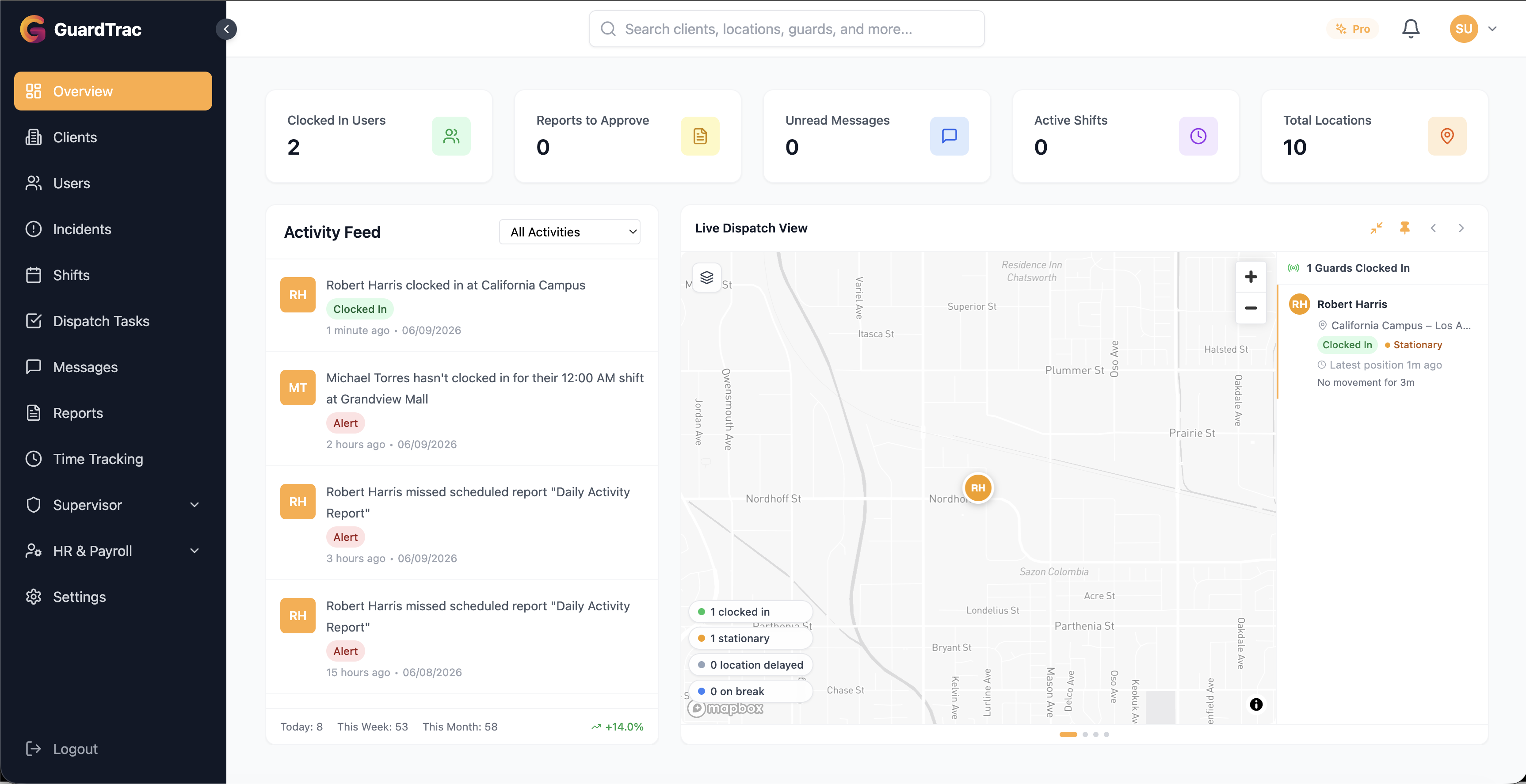
Searching for the best guard software turns up a lot of ranked lists, and many are written by review sites that take money for placement. This one is written by a vendor, so we’ll say that up front: GuardTrac is one of the seven platforms below, and we’ve tried to be straight about where the others are a better fit.
We checked each vendor’s own website in October 2026 for pricing and features. Where a vendor doesn’t publish something, we say so instead of guessing. Software changes fast, so confirm current pricing before you buy.
If you’re new to this category, start with our complete buyer’s guide to security guard management software, then come back here to compare options.
Quick Comparison
| Platform | Best for | Starting price (as published) | Free trial |
|---|---|---|---|
| GuardTrac | Small to mid-size firms wanting one all-in-one platform with AI | From $7.50/user/mo ($6 billed annually) | 14 days, no card |
| GuardsPro | Firms that want modular, pay-for-what-you-use pricing | $5/user/mo (Essential, 3-user minimum) | 30 days |
| Guardix | Teams that want AI features and tiered plans | $8.99/user/mo (Starter) | Demo only |
| Belfry | Larger firms that want payroll, billing, and HR in one system | Not published (per employee) | Demo only |
| TrackTik | Large and enterprise operations, in-house corporate security | Quote-based (not published) | Demo only |
| QR-Patrol | Patrol-focused teams that want NFC/QR hardware options | From about $50/mo for 1–3 guards (annual) | Free testing |
| Silvertrac | Established patrol and dispatch operations | Varies by source — request a quote | Demo |
What We Judged Them On
Every platform here handles the basics. These are the criteria that separate them:
- Guard experience. If guards won’t use the app, nothing else matters.
- Verification. GPS clock-ins, geofencing, and checkpoint scans (QR, NFC, or GPS) that prove presence.
- Reporting. Incident reports with photos, plus something clients can actually see.
- Operations depth. Scheduling, time tracking, and whether payroll and billing are included or bolted on.
- Price transparency. Can you find out what it costs without a sales call?
- Setup speed. Can you be running on a real site this week?
1. GuardTrac
Best for: small to mid-size security companies that want guard tracking, scheduling, reporting, and payroll in a single platform.
GuardTrac covers the full day-to-day: GPS-verified clock-ins with geofencing, QR, NFC, and GPS checkpoint tours, incident reporting from the guard app, scheduling, a client portal, an HR and payroll module, and in-app messaging. Its standout feature is TracBot, an AI assistant that answers questions from your own data (“Which guards were late this week?”) instead of making you dig through reports.
Pricing: Essentials is $7.50 per user per month, or $6 billed annually ($72/user), and covers tracking, patrols, scheduling, timesheets, messaging, custom reports and the client portal. Pro is $10 per user per month, or $8 billed annually ($96/user), and adds TracBot, HR and payroll (ADP, QuickBooks and CSV), time-off requests, GPS checkpoints, automated client report emails and the Dispatch Operations console. Both start with a 14-day free trial with no credit card required. Enterprise is custom, with volume pricing, custom integrations, a dedicated account representative and priority feature requests. See the pricing section for current details.
Strengths: Transparent pricing, fast self-serve setup, two simple self-serve plans, built-in AI assistant.
Trade-offs: GuardTrac is a newer, focused platform. If you need deep benefits administration or very customized enterprise integrations, ask us about it directly or look at a larger HR-oriented system like Belfry.
2. GuardsPro
Best for: firms that like to add modules à la carte.
GuardsPro (not to be confused with similarly named products) uses a modular model. Essential is $5 per user per month and covers a dashboard, time clock, reporting, and live GPS tracking. Advanced is $8 and adds GPS history, geofencing, and messaging. Professional is $10 and adds site tours, automatic email reports, integrations, and tasks. Add-ons like Scheduler ($2), Payroll, Dispatcher, Invoicer, and Visitor Manager ($1 each) are priced per user. There is a 30-day free trial and a 3-user minimum.
Strengths: Low entry price, 30-day trial, client web portal, no long-term contracts.
Trade-offs: Scheduling, payroll, and invoicing are add-ons, so a full setup costs more than the headline price. The pricing page shows two sets of prices without clear labels, so confirm what you’ll actually pay.
3. Guardix
Best for: teams that want tiered plans with AI included.
Guardix publishes three tiers: Starter at $8.99, Professional at $14.99, and Enterprise at $19.99, all per user per month, with 20% off yearly billing. Starter includes GPS tracking, scheduling, and incident reports with a basic AI assistant; Professional adds live tour tracking, advanced scheduling, and AI insights. Clients can view live patrol status and reports through a portal. Starter supports up to 50 guards and Professional up to 500.
Strengths: Clear tiers, AI at every level, client portal, PDF and CSV exports.
Trade-offs: The pricing page doesn’t mention a free trial (it points to a demo), and we couldn’t confirm NFC/QR checkpoint scanning or offline support from the page, so ask about both.
4. Belfry
Best for: larger or growing firms that want payroll, billing, and HR in the same system as operations.
Belfry is built around back-office depth. It’s organized into modules: scheduling and timekeeping, operations (guard tour, reporting, client portal), billing and payments, payroll with onboarding and HR support, and benefits administration with ACA compliance. Pricing is per active employee per month.
Strengths: The deepest payroll, billing, and benefits coverage of the group; you’re billed only for active employees.
Trade-offs: No published prices and no free trial — you’ll book a demo to get a quote. Patrol and dispatch is listed as an advanced package. That breadth can be more than a small firm needs.
5. TrackTik
Best for: large guarding companies and in-house enterprise security teams that need a long-established, heavily configurable platform.
TrackTik (now part of Trackforce) is one of the best-known names in the category, built for guarding companies and corporate security departments. Its Guarding Suite covers workforce management, with payroll and invoicing, client management, and overtime controls, and higher tiers and add-on modules extend it for bigger operations.
Pricing: Not published. Quotes are custom, and third-party sites report widely differing figures, including per-location licenses, one-time setup and training fees, and multi-month minimum terms. Treat any number you see online as unreliable and ask for a written quote that covers per-location versus per-user pricing, setup fees, contract length, and renewal increases.
Strengths: Enterprise-grade scale and configurability, a long track record, and a wide module catalog.
Trade-offs: No public pricing or self-serve trial, and reviewers describe setup fees, add-on costs, and contract terms that can be heavy for a small firm. If you have under a few hundred guards, a lighter platform will usually get you running faster.
6. QR-Patrol
Best for: patrol-focused teams that want NFC tags, QR codes, and optional hardware like beacons and SOS buttons.
QR-Patrol is a long-running patrol platform. Pricing is by plan (Base, Pro, Gold) and guard count: for 1–3 guards, Base runs about $59 per month ($50 billed annually), and costs scale with team size. Every plan includes QR codes, NFC tags, beacons, geofencing, in-app SOS, real-time reports, and AI reports. Higher tiers add indoor location, forms, API access, and face verification. Tags and accessories are sold separately.
Strengths: Flexible checkpoint hardware, safety features like man-down and SOS, published pricing tables.
Trade-offs: Pricing by guard-count band gets expensive as you grow, and it’s patrol-first rather than a full back-office system.
7. Silvertrac
Best for: established operations that want patrol tours, dispatch, and branded client reporting.
Silvertrac offers guard tour management with GPS and QR checkpoint scanning, missed-task alerts, incident reports with photo and audio, dispatch and task tools, and branded reports with a client access portal. Pricing is per active device and is reported inconsistently across third-party sites (figures from about $50 to $249 per month appear), so request a quote and ask about setup fees and contract terms.
Strengths: Mature patrol and dispatch feature set, branded client reports.
Trade-offs: Opaque pricing and no clear self-serve trial.
How to Choose
- Small firm, want to start this week, with predictable pricing: GuardTrac, GuardsPro, or Guardix.
- Need payroll, billing, and HR under one roof: Belfry, or GuardTrac’s HR and payroll module if you’re smaller.
- Large enterprise or in-house corporate security team: TrackTik or Belfry.
- Billing disputes are your biggest pain: GuardTrac’s GPS-verified time tracking.
- Patrol hardware is the priority: QR-Patrol or Silvertrac.
- You want AI to answer questions about your own operation: GuardTrac (TracBot) or Guardix.
Whatever you shortlist, run a real trial on a real site. Have your guards use it for a week and ask them what they think. Adoption is the number that decides whether any of this works. For a deeper look at the capabilities worth paying for, see our guides to GPS tracking for security companies and reducing guard turnover.
Frequently Asked Questions
What is the best security guard software? It depends on your size and priorities. For small and mid-size firms that want everything in one platform with transparent pricing, GuardTrac, GuardsPro, and Guardix are the closest comparisons. Larger firms that need payroll and HR depth or enterprise scale often look at Belfry or TrackTik, and patrol-focused teams look at QR-Patrol or Silvertrac.
How much does security guard software cost? Most platforms charge per guard per month. Published entry prices in this comparison range from about $5 to $9 per user per month, with higher tiers at $10–$20, and some vendors price by active device or guard-count band instead.
Is there free security guard software? Some vendors offer free trials rather than permanent free plans. GuardTrac offers a 14-day free trial with no credit card, and GuardsPro a 30-day trial. Always check current terms, since free plans change often.
What features should security guard software have? At minimum: GPS-verified clock-ins with geofencing, checkpoint tours (QR, NFC, or GPS), mobile incident reporting that works offline, scheduling, and client-ready reports. Payroll and billing integration is a major time saver as you grow.
Do small security companies need guard management software? Yes. Small firms feel lost contracts and payroll disputes the most, and per-guard pricing makes these tools affordable at any size.
The Bottom Line
The best security guard software is the one your guards will actually use and that covers your biggest pain point — whether that’s proof of patrols, scheduling, or payroll. Shortlist two or three, trial them on a live site, and compare the real guard and client experience.
Want to see how GuardTrac stacks up? Start a free 14-day trial — no credit card required — or contact our team with questions about your operation.
Put it into practice
Bring your security operations together.
Manage guards, schedules, patrols and reporting in one place. Try GuardTrac with your own team and sites.
- Guard tracking
- Shift scheduling
- Client reporting
14-day free trial. No credit card required.