Security Guard Management Software: The Complete Buyer's Guide (2026)
What security guard management software does, the features that actually matter, what it costs, and how to choose the right platform for your security company.
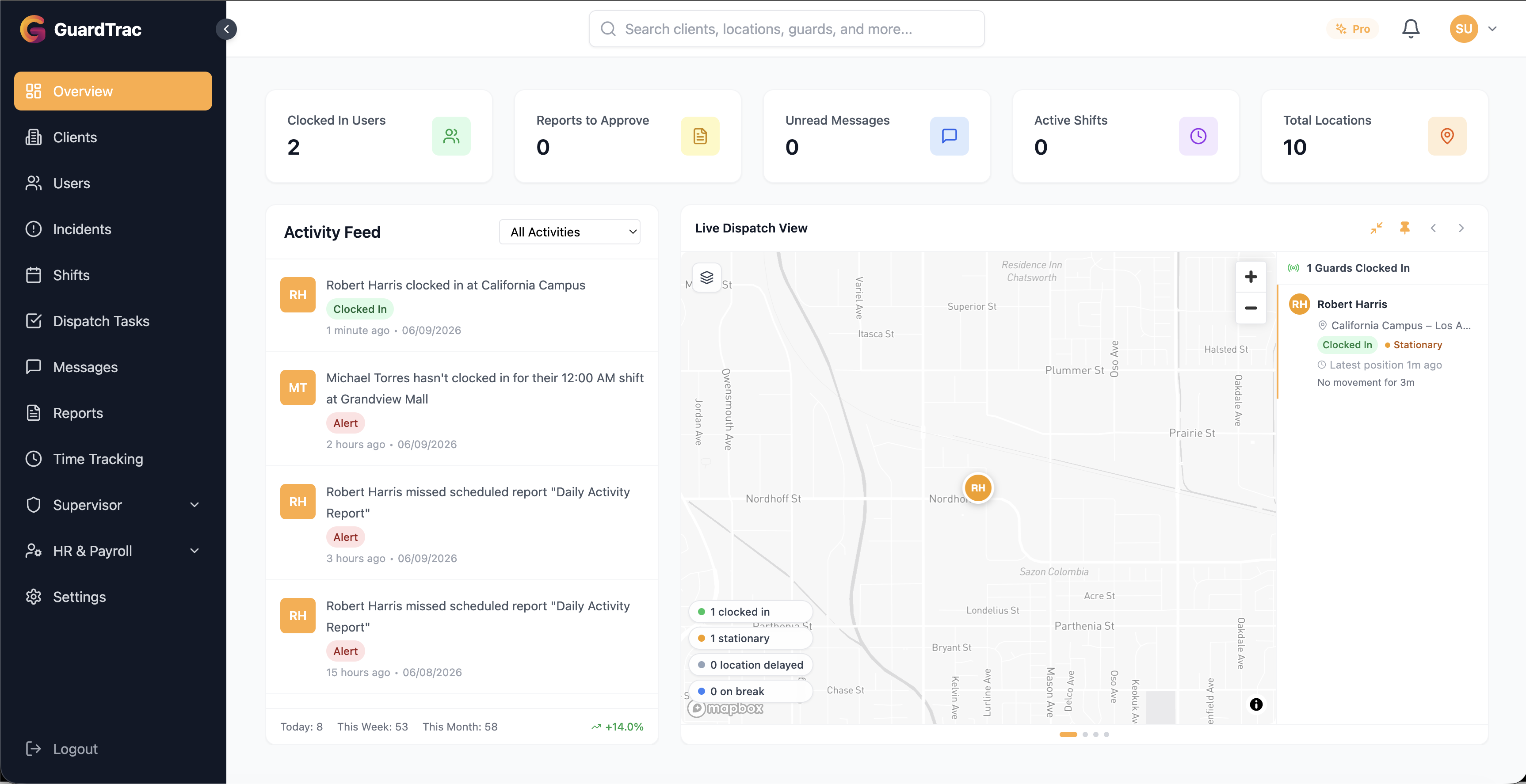
If you’re still running your security company on spreadsheets, group texts, and paper patrol logs, you already know the cost: missed clock-ins, disputed hours, lost reports, and clients who can’t see what they’re paying for. Security guard management software exists to replace all of that with one connected system.
This guide explains what the software does, which features genuinely matter, what it costs, and how to choose a platform that fits your operation — without the sales-pitch fluff.
What Is Security Guard Management Software?
Security guard management software is a platform that runs the day-to-day operations of a security company: tracking where guards are, scheduling shifts, verifying patrols, capturing incident reports, and producing the records you bill clients against.
Most modern systems have two halves:
- A web dashboard for owners, managers, and dispatchers to schedule, monitor, and report
- A mobile app that guards use on shift to clock in, scan checkpoints, file reports, and communicate
Together they replace the patchwork of tools — paper logs, spreadsheets, texting, separate payroll exports — that most small and mid-sized security firms cobble together.
The Features That Actually Matter
Vendors list dozens of features. In practice, a handful drive almost all the value. Prioritize these.
Real-Time GPS Tracking and Geofencing
The core of the whole category. Live location lets dispatch see every active guard, and geofencing ties clock-ins to the physical site so guards can’t punch in from home or the parking lot. This single feature eliminates buddy punching and gives you proof-of-presence for clients. (We go deeper in our guide to GPS tracking for security guards.)
Scheduling with Conflict Detection
Building schedules is where most managers lose their week. Look for a timeline view across all sites and automatic conflict detection that flags double-bookings and overlaps before they become no-shows. Good scheduling is also one of the biggest levers for reducing guard turnover.
Checkpoint and Patrol Tours
QR-code or NFC checkpoints let guards prove they walked the full route. The system records each scan with a timestamp and location, turning “did the patrol happen?” into a verifiable log instead of a guess.
Incident Reporting
Guards should be able to file a report in seconds — with photos, GPS location, and timestamps — from their phone. The best apps work offline and sync later, because remote sites rarely have perfect signal.
Time Tracking and Billing
GPS-verified clock-ins double as your timekeeping system. That means the hours you bill clients and pay guards come from the same trusted source, eliminating the disputes that come from manual timesheets.
Communication
Built-in messaging and broadcast alerts keep lone guards connected to dispatch and let you push urgent updates to everyone at once.
What Does Security Guard Management Software Cost?
Pricing in this category is almost always per-guard, per-month, sometimes tiered by feature set. Expect:
- Entry tiers for smaller teams with the essentials (tracking, scheduling, reporting)
- Mid tiers that unlock the full feature set
- Enterprise tiers for large operations with advanced needs
The right way to evaluate cost isn’t the sticker price — it’s the return. One prevented buddy-punching incident, one retained client who can finally see their patrol reports, or one week of management time saved on scheduling typically covers the monthly cost several times over. See GuardTrac’s pricing for a concrete example.
How to Choose the Right Platform
Run every option you’re considering through these questions:
- Will guards actually use it? If the mobile app is clunky, adoption fails and the data is worthless. Test the guard experience, not just the dashboard.
- Does it work offline? Remote sites lose signal. The app must keep working and sync later.
- How fast is setup? You shouldn’t need a month and a consultant. Look for systems you can configure yourself in a day.
- Can you export client-ready reports? Proof-of-presence reports are a sales and retention tool — make sure they’re easy to generate and share.
- Does pricing scale with you? Per-guard pricing should make sense whether you have 10 guards or 200.
- Is there a free trial? You should be able to test it on a real site before committing.
Signs It’s Time to Upgrade
You’re ready for dedicated software when you recognize these:
- You can’t answer “is this guard on-site right now?” without making a call
- Scheduling eats a full day of your week
- Clients ask for proof of patrols you can’t easily produce
- Payroll disputes over hours are routine
- Incident reports get lost, delayed, or never filed
If two or more of those sound familiar, the spreadsheet era is costing you more than software would.
Frequently Asked Questions
What is the best security guard management software? The best platform is the one your guards will actually use and that covers tracking, scheduling, checkpoints, reporting, and billing in one place. Evaluate adoption and offline reliability as heavily as the feature list.
Do small security companies need this software? Yes — arguably more than large ones. Small firms feel every lost contract and payroll dispute acutely, and modern per-guard pricing makes the tools affordable at any size.
Can it replace separate payroll and timekeeping tools? GPS-verified clock-ins serve as your time-tracking system of record, which most companies then export to payroll — removing manual timesheets from the process.
The Bottom Line
Security guard management software pays for itself by eliminating the leaks in a manual operation: time theft, lost reports, scheduling chaos, and unverifiable patrols. The companies that adopt it run leaner, win more contracts, and keep clients longer.
Want to see it in action? Start a free 21-day trial of GuardTrac — no credit card required — or contact our team to talk through your operation.
Ready to try GuardTrac?
Start your free 21-day trial today. No credit card required.
Start Free Trial