← All features
Client Portal & Reporting

Keep clients informed. Show the work behind every shift.

Bring site activity, reports and client updates together. Give each client a portal view and set up scheduled report delivery for the locations they care about.

Client updates, organized around each site Demo data
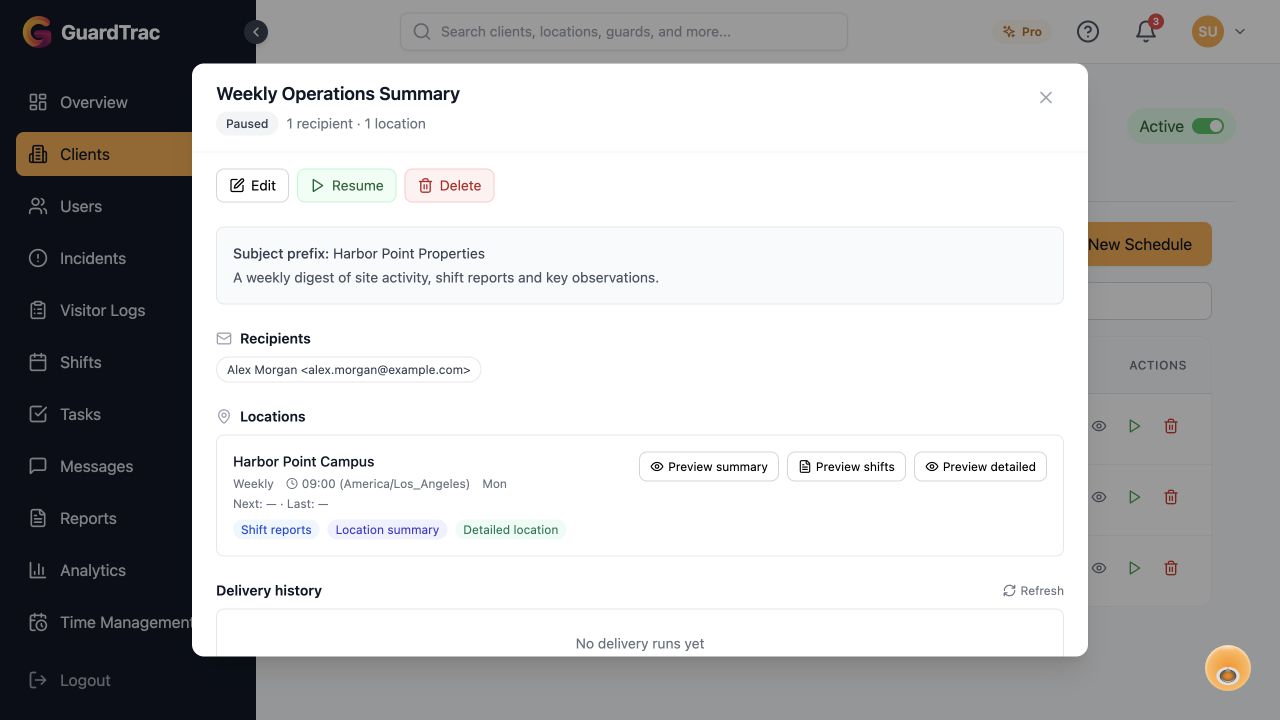
GuardTrac weekly report delivery configuration for Harbor Point Properties, showing a demo recipient, Harbor Point Campus, weekly timing, and shift report and location report previews.
Actual GuardTrac interface with a sample weekly client update for Harbor Point Properties. This demo schedule is paused. Select the image to explore the full-size view.
GuardTrac weekly report delivery configuration for Harbor Point Properties, showing a demo recipient, Harbor Point Campus, weekly timing, and shift report and location report previews.

A portal built around the client

Help clients find information about their locations without forwarding every update yourself.

  • Choose which portal pages each client user can see.
  • Provide access to reports, incidents, shifts, checkpoints and location tracking.
  • Include post orders, contacts and billing visibility where appropriate.

Report delivery on a schedule

Configure recurring client updates with the right recipients and timing for each location.

  • Set daily, weekly, biweekly or monthly delivery schedules.
  • Choose location summaries, shift reports and detailed location reports.
  • Preview PDFs, send a test email and review delivery run history.
  • Pause or resume schedules as client requirements change.

Present the evidence professionally

Make site reporting part of your service, with information that is easier for clients to review.

  • Use organization branding and branded PDF exports.
  • Share site activity and report submissions from the same platform.
  • Match visible portal modules to each client relationship.
Start Free Trial →

Feature availability varies by plan and account permissions. Talk with us about your requirements.